Posts

Showing posts with the label Computing

Exploring Excitable Edgar

Image
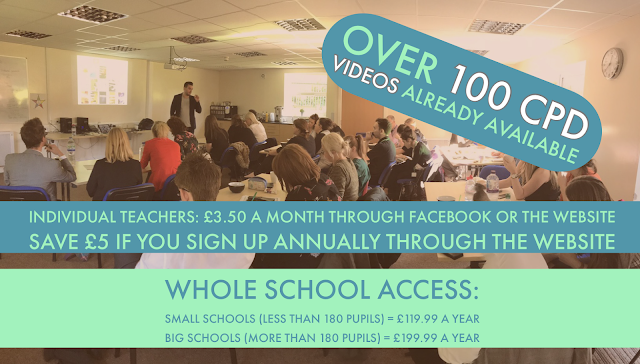
Having previously blogged about Christmas Adverts, in particular, the John Lewis Ad, it was only inevitable I would do the same with their latest effort: With my new website - MrPICT.com , I have put together a whole topic page looking at creative ways to explore the advert: The first two ideas are COMPLETELY FREE. Just click the picture above and add your email address to download all the comprehension questions linked to the advert. What I have tried to do with this topic page is show how you can challenge children and show progression with certain tasks in computing. In my class, we have been looking at ideas 12-15. I wanted to share the outcome to this: My class were made up when John Lewis themselves commented on their work: For step-by-step tutorials for how to do this with your class, sign up to MrPICT.com for just £3.50 a month. You can subscribe annually and save £5. Alternatively, you can sign up for a whole school licence meaning ever...
Exploring Our Digestive System

Image
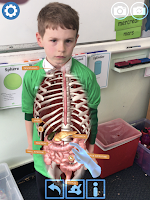
Last half term, Year 4 were looking at Digestion. As always, I wanted to explore how technology can be used to enhance learning and allow them to creatively share what they have learnt. There are some fantastic consumer apps that can help with this including the fantastic Curiscope Virtuali-tee app I have previously blogged about here. For a more in-depth tutorial for this tool, including an exclusive discount code to subscribers, click here. There is also a fantastic Google Expedition that links to the Digestive System which allowed the learners to jump inside the body to learn about each part of the digestive system and the job it does. Again, you can access an in-depth tutorial through MrPICT.com here. Once we had used these consumer apps to acquire knowledge, I wanted my students to use the technology to create content to show what they have learnt. This is what my pupils created using a range of apps such as Doink Greenscreen, Apple Clips and Shadow Puppets Edu....

Why do we edit and filter our selfies?

Image
This was a digital literacy lesson I did with Year 4 last week: I have also posted a more in-depth step-by-step tutorial for what we did and how we did it exclusively for the supporters of my Facebook page. You can access this and everything else on MrPICT.com by clicking the picture below:

Creating your own Lego Movies

Image
With Lego Movie 2 hitting cinemas this week, I decided to embrace the children's enthusiasm to introduce stop motion animation. Stop Motion Animation is a brilliant and creative way for students to tell stories, explore ideas and explain different concepts. There are plenty of different stop motion animation apps. My go-to app is I Can Animate. There are so many possibilities with this app as you can link it with greenscreen to add an animated background before editing further in iMovie. Here is an example of something we created: I have posted a step-by-step tutorial video for how to create something like this exclusive to the supporters of my facebook page. Click here to sign up.

Book Review Vlogs

Image
As I recently discussed in a previous blog post (click here to read)  I really think, when used effectively, technology can enhance and support a student's love of reading. In most classrooms, once a child finishes a book they will be asked to then fill out a book review worksheet. Something along the lines of this... I don't want to sound like I am having a go at any teachers who do these types of worksheets. I just believe with technology so easily accessible in schools, it should be used to enhance this task to add more purpose and engagement. Using an app like Apple Clips, children can turn their book review into a VLOG (video blog.) Not only does this add more purpose to the writing (children have to write the script of their book review first), you will be developing key oral speaking objectives and ICT skills. In my experience, these worksheet type activities are rarely done to the best of children's ability as they are used as a time filler or carousel acti...

MrPICT.com

Image
A few months ago, Facebook gave me the opportunity to launch a supporter aspect to my page. For £3.50 a month, teachers can subscribe to receive the following benefits: This platform, for me, is a way to bring my CPD training in schools online. I regularly receive messages from teachers saying that they would love to attend one of my CPD and Inset sessions, however, due to one reason or the other (location, school not allowing them to go etc) they can't make it. It gives teachers the opportunity to take ownership of their own professional development. I honestly think that the best resource in the classroom is the teacher and I want this platform to be a way teachers can build confidence in knowledge to best make use of the technology in their classroom. So far, it has been amazing to have so many people sign up and the feedback has been so positive, especially when you see teachers using the ideas and sharing the incredible work from their pupils. Over the ...

Creating an Interactive Christmas Scene

Image
I love using Christmas as a way to engage children in their learning. They are excited, inquisitive and generally really interested in anything Christmas. Recently, I worked with Year 2 where they created their own Interactive Christmas scene using Chatterpix Kids and Thinglink. Here is an example of what they created: I have posted a step-by-step guide for how to do this activity on the supporter part of my Facebook page. Sign up by tapping the picture below: This idea can easily be adapted to other areas of the curriculum, such as: Read more about this idea here. Read more about this idea here. Read more about this idea here

Support Rang-Tan by Downloading my Pupil's eBook

Image
You will have seen over the past half term I have been working on a very important topic with Year 4 inspired by the Greenpeace "There's a Rang-Tan in my Bedroom" advert. This has since been used by Iceland Foods as their Christmas advert but has been banned from TV. This has culminated in a very special project where my class have all become published authors. To read what we have done so far, click the pictures: The first link looks at the advert in more detail and the work my class produced writing in role as an Orangutan seeing their home destroyed.  The next post looks at the letters my class have written to all the companies with links to dirty palm oil and the responses we have received. Over the past couple of weeks, we have been learning more about Orangutans. We started by generating questions we wanted to find the answers to and then looked at researching on the internet to find the answers to the questions. ...

Launching Mr P's Online CPD support on Facebook

Image
I regularly receive messages from teachers saying that they would love to attend one of my CPD and Inset sessions, however, due to one reason or the other (location, school not allowing them to go etc) they can't make it. I have been thinking for a while about trying to create some sort of online platform where teachers can access more detailed CPD content. I have and always will share content for free through this blog and my social media pages. However, I always need to strike the right balance as to make sure I don't give too much away for free as this often backfires in loss of work in schools and also a number of people who then take the ideas, rip them off and make money on the back of it. About a week ago, Facebook introduced Fan Subscriptions. Followers of my facebook page can subscribe for £3.50 a month and receive exclusive content. CLICK HERE TO SUBSCRIBE I've decided to give this a go, to hopefully support more teachers in their journey to utilise tec...

Creating Self Portraits on Keynote

Image
Since the update Keynote received over the summer, which unleashed a wealth of creative possibilities, I have been desperate to give it a go in class. In Year 4, we decided to create our own self-portraits to get used to the drawing tools. Although we had an issue updating a few of the iPads (Keynote is a big app) we had a good go and I was really impressed with some of their efforts: I've created a step by step guide for how to do this activity with your class. You can watch it here: This will be an app I will be exploring a lot more this year in my school so stay tuned!

More Keynote Awesomeness

Image
#EveryoneCanCreate  is a hashtag I have very much enjoyed following since the ADE summit in Texas this month. From some of the ideas I had seen, my son created this before his school trip to the zoo: Click here for a more detailed description of what we did to create this video. It was this tweet from Matthew Pullen  which inspired this latest idea: It’s been a labour of love but I wanted to share how I created it. Shout out to all those that shared the original concept, @BenMountz @WesMolyneaux et al. I never thought I could draw but now I have the right tools in #iWork #ade2018 #appleeduchat #everyonecancreate @AppleEDU pic.twitter.com/DXQWq1Cwyy — Mathew Pullen 🏴󠁧󠁢󠁷󠁬󠁳󠁿 (@Mat6453) July 22, 2018 Following the thread, @JoeDale then suggested an app which might make the Video to still image stage a little easier: Great job. With the Video 2 Photo app you can export multiple frames to the camera roll in one tap which may make this rotos...

Getting Creative with Keynote

Image
I am not going to lie, I am very jealous of all the amazing teachers attending the Global ADE 2018 summit in Texas. I have been closely following the hashtag #WWADE2018 and #EveryoneCanCreate and enjoying some of the amazing content being created and shared. It has reminded me of all the brilliant new additions to the Keynote app and inspired me to try some with a project with my children. They are going on a school trip tomorrow to the zoo and so created this animated quiz about animals: Keynote has been an app that I have used personally in my CPD and training sessions for years. Essentially, it is Apple's version of Powerpoint. At the UK ADE summit last year I was very fortunate to get a one to one tutorial with a Keynote expert, Alan Rosenfield , who really opened my eyes to creating engaging content to support my training sessions. More recently, Apple have announced a number of new updates to Keynote which take the app beyond a simple presentation app to an incredib...

Making our own Interactive Avengers Story Cubes

Image
Before I start discussing what we did, it is only right to share where the original idea for this project came from. This blog post by the brilliant @Joe_Moretti  gave me the inspiration for this project - AR STORYCUBES PROJECT I have been using my iPad with my children to support them with their reading journal homework for a while now. My boys struggle with their handwriting and find it very onerous to write even though they have some great ideas. As discussed by @MrTullock at the Animate2Educate conference last week, technology should be used to enable children to show their knowledge and understanding even if they struggle with an element such as decoding or handwriting or spelling. I loved a quote he shared, and I have linked it in a poster to the story @CarolJAllen shared around the latest BGT winner. I want to use technology so my children and pupils can create content to express themselves, their knowledge and their understanding. Making our own Interac...

Reading Comprehension through World Cup Songs

Image
So the World Cup is here! I'm sure many of your pupils are excited and can't wait to see their footballing idols in action. A great resources to link to the World Cup, which helps raise standards in English but also embeds key digital literacy skills is the Read Write Perform Sports Manager Pack: Buy the pack before England are knocked out and get my 15 iPad Lessons for the World Cup eBook for FREE! There are also other ways in which you can use the World Cup to engage pupils in English. Music seems to go hand in hand with football, from chants in the stadiums to songs in the charts. This great article discussing the power of the football song -  http://www.bbc.com/culture/story/20180614-world-cup-2018-the-extraordinary-power-of-the-football-song Why not use some of the most popular songs from past World Cups and Euros as texts for comprehension?  I have previously blogged loads of different songs you can use in class and you can read them all here:...

Creatively Retelling The Very Hungry Caterpillar

Image
Who doesn't love this book? An absolute classic!  With Year 1 doing their Minibeast topic, I had to make a link and explore the book. We had read it through and used some of the brilliant Talk4Writing techniques to help us retell the story. To engage the children further, we decided to create our own version of the story starring Year 1. To do this we used the masking tool with the brilliant Doink Greenscreen app. This short video demonstrates the process: Once all the children had created their video on Doink Greenscreen. We put it all together in Apple Clips where pupils could also add emojis for all the food. This was their finished video: I can't wait to use this idea with other areas of the curriculum!

Creating Interactive Guides to the Human Body

Image
You may remember a project I did with Year One last term: I decided to do a similar project with Year Three for their science topic about the Human Body.  We started with the Curiscope Virtuali-tee. This amazing augmented reality t-shirt never fails to create a lesson of awe and wonder! If you've not ordered one of their t-shirts, I would highly recommend it. Buy a t-shirt here. As a class, we explored all the different parts of the body and used the guide to learn facts about how our body works and what each organ does. The children were then given a part of the body and given some more time to find other facts about it. Using the app Chatterkids Pix, the children had to create animated videos sharing their learning. The students also used Greenscreen to create images giving the illusion we could see inside their body. Using Seesaw, they labelled all the different parts of the body: To link everything together, we used the app Thinglink...