Posts

Showing posts with the label VR

Figment AR to Inspire Writing

Image
Today I worked with one of our Year 3 classes and I eventually had the chance to try out a new app I've been desperate to use - Figment AR . I first heard of this app after reading a blog post from the brilliant @ICTEvangelist . You can read his blog post here: Figment AR For Story Telling And Re-Living Field Trips In IOS   The feature in the app which I was immediately drawn to was the portals feature. This allows you to place a portal within your world. This portal allows you to travel to any 360° image. There are a couple of pictures included but you can also add your own. Straight away I knew this would be something that would inspire some amazing writing in my class and today I finally got the chance to have a go with our brilliant Year 3 pupils. But as I always discuss on my CPD and INSET the big hook was what they were going to do with their writing which was to bring it to life and create their own movie! As their topic is linked to space, we deci...

Creating our own VR with CoSpaces!

Image
Embracing Social Media as a teacher has completely transformed my teaching. In fact, it has taken my career on a path I never dreamed possible. I love how many ideas I pick up from Twitter, Facebook, Instagram and Pinterest. This is one app I spotted recently: @HelenCaldwel @ICT_MrP @SchPrehistory @DoInkTweets @WulfgarTheBard CoSpaces for VR Stone Age monuments. Video walk through for green screen😎 pic.twitter.com/jqY9p7oy4b — Ms Weston's Class (@vweston8) February 17, 2017 I have been wanted to find a way to create my own VR for a while and CoSpaces seems to be a great tool for this. The website and app both allow you to create your own VR environment. It is free to use and just needs an email and password to get going. This week my digital leaders gave it a whirl and they absolutely loved it. To begin with they were given some tinkering time. I gave them 15 minutes to simply play, experiment and discover the app and the way it works. We then looked at...

Learning about the body with the amazing Curiscope Virtuali-tee app!

Image
I love using technology to create moments of awe and wonder with my pupils. Two of the best tools for this are Augmented Reality and Virtual Reality. Imagine an app which combines both to make learning about the Human Body more fun and interactive than ever before! I have been following the progress of the Curiscope  project for the best part of a year after backing the campaign on Kickstarter. It is fantastic to finally see the app and t-shirt available. The app is FREE however it needs one of the t-shirts to work. The t-shirts come in a variety of colours and sizes and can be ordered here . Once you have the t-shirt, one pupil can wear it and the others can use the app on different devices to scan the t-shirt, where they are then able to see inside the body! As you can see with the following gif created with my sons. The app allows you to investigate different physiological systems such as the circulatory and respiratory systems. You can tap an option to have a v...

Google Expeditions in the Classroom!

Image
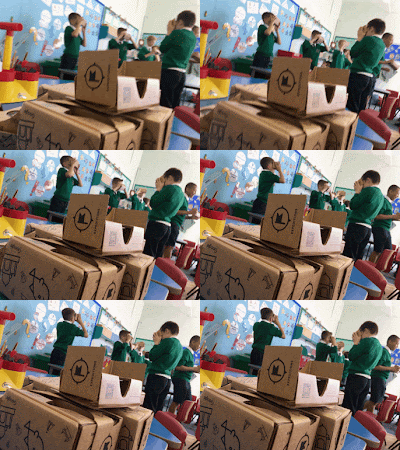
Today has been a day I have been looking forward to for over six months. When I first heard about Google Expeditions , I immediately tried to sign up to find out in was only available in America. Fast forward a few months and Google have now deployed the tool in England and what an amazing tool it is! So thanks to  +Dughall McCormick  who sent the Google team my way, I was able to book a day with a Google representative. They brought in two class sets of the Google Cardboard headsets with Android devices.  The cardboard headsets can be used with children aged 7 and over so all our KS2 classes had a lesson with them. On each of the devices was the 'Google Expeditions' app. This is available on iOS and Android. The teachers had to choose from the 250 expeditions available. We tried to link these to our current topics. Each teacher then controlled the session through the leader tool within the app. Here they can load the different scenes from each expedition. On al...

More 360 Videos to Inspire Writing!

Image
There are some brilliant 360 degree videos that are absolutely great and would provide a fantastic stimulus for writing in class! I have previously blogged about 360 videos here - Facebook 360 videos to Inspire Writing A 360 video is created with a camera system that simultaneously records all 360 degrees of a scene. Viewers can pan and rotate a 360 video's perspective to watch it from different angles. They can be viewed on a desktop computer or a mobile through specific apps. The videos are very popular on Facebook but most are also on Youtube where you can also view them using a Google Cardboard making the video 3D and truly immersive. I have previously blogged about Virtual Reality and Google Cardboard here: Virtual Reality in the Classroom.  To do this, just tap the glasses icon on the YouTube clip: So here are a couple of my favourites for you can use in class: Rather than embed all the videos here, I have compiled a YouTube Playlist containing all the...

Travel back in time with Virtual Reality!

Image
Virtual Reality is getting more and more popular. Having used Google Cardboard in the classroom for the past year, it never surprises me how immersed and engaged children can are when exploring different environments straight from the classroom. The Google Expeditions project looks like it will take Virtual Reality to the next level in the classroom - I have previously blogged about Virtual Reality, including allowing children to ride virtual rollercoasters - Using Virtual Reality in the Classroom We turned Year 3 into Deep Sea Divers  - Year 5 explored Virtual Jurassic World -  There are a variety of virtual reality apps available on the app store, plenty of which have a 2D option so the app can be viewed on an iPad if you don't have enough headsets and devices. A couple I have stumbled across have come from the brilliant team over at Computeam. VR Roundhouse Trench Experience VR Both these apps allow you to immerse yourself an...

6 Ways To Use the Star Wars App in Class!

Image
I loved the new Star Wars film, I thought it was brilliant! In the build up to the movie, I had been using Star Wars as a stimulus as I knew a lot of the children were also excited about it. I did a big project based on the BB-8 Sphero in class. You can read about what we did with BB-8 here.  With another class, we explored an 360 degree video based on one of the Star Wars planets and wrote a story based on this - The boy who created this example was amazed to see the Mark Hamill, Luke Skywalker himself liked the video! I also had to get involved with  @iPadEducators  and his Star Wars Project that you can  read here. Today,  @WatsEd  shared the following tweet -  Have students explore a Star Destroyer or Niima Outpost in 360-degrees then write a story based on observations: https://t.co/zmSvlo1sso — StarWarsintheClass (@StarWarsinClass) January 8, 2016 The web link is fantastic and gives an amazing immersive panoramic ima...

Exploring our own Jurassic World!

Image
Last week, I blogged about working with a class and writing our own guides to Jurassic World using this website - http://uk.jurassicworldintl.com/ You can read the blog post and see some of the children's guides here. Since the release of the film Jurassic World, the website has updated to collate with the events of the film! Today we continued to use the theme of Dinosaurs with some narrative writing. We first started by exploring the app Dino Park VR . This free app works best with a Google Cardboard headset, but will also work in 2D mode on an iPad. You can read more about Virtual Reality by reading this blog post and this blog post.  The app takes children on a short tour of a virtual dinosaur park and allows them to take a full 360 degree view of the surroundings. Children were instantly immersed in this world and discussed what they could see, hear etc.  Using the record feature on Airserver , I recorded one of the journeys the children went on in th...

Finally... some alternatives to Epic Citadel - Deep Sea Diving with Year 3

Image
Epic Citadel is and has been a must for most primary schools with access to iPads. The app allows children to navigate around a medieval kingdom, which can inspire children to write all sorts of different text types. The multi-sensory environment allows children to fully immerse themselves in this virtual world and inspires them to some fantastic writing. I have previously blogged about Epic Citadel - here . The problem I have faced is finding alternative apps that allow children to immerse themselves in virtual worlds. I have used Myst and Castlerama , however, both are a similar style setting to Epic Citadel. The team behind Epic Citadel have recently released Zen Garden which is a step in the right direction - However, there is a massive gap in the app market for more virtual world apps to be created. There doesn't need to be any sort of game element, just a world that children can navigate around and use as a stimulus for writing. Even if game developers simply st...

Using Virtual Reality in the Classroom!

Image
I recently purchased a Google Cardboard Virtual Reality headset. Placing your smartphone into the headset and loading a compatible app, the lenses create an impressive and rich 3D environment. Most compatible apps are available on Android, as the concept for this headset was created by Google. There are however a few iPhone apps and YouTube videos you can use on your iPhone. Possibly the best app for the headset on iPhone is - Dive City Coaster. And this is what we used in class today to inspire some writing. Today I was working with a Year 2 class and I asked them if they had every been to a theme park before? We then discussed what we find at a theme park. Once we identified Rollercoasters as a feature, I asked how many have been on. Of course no-one had, as they are too young. However I told them today they are virtually going to ride a rollercoaster. Before children immersed themselves in the rollercoasters, we discussed why people ride them and why they are popular. We...